For consultants managing multiple client relationships across Google and Microsoft.

Recover your client's context before every call in 30 seconds.

Pamony reads your calendar and instantly retrieves context from Google Drive and OneDrive — so you walk into every client call with the full picture. Before the meeting and during the meeting. Without switching a single tab.

Get Pamony for $12/Month →

Instant access · Google Drive & OneDrive · Cancel anytime · Every switch has a hidden tax. We eliminate it.

Powered By Leading Tech Companies

You already know
the problem.

You've lived it every single day this week.

The endless tab-switching and "where did I save that file?" panic.

Losing 15-20 minutes every time you switch between clients — rebuilding their world from scratch, every single time.

Showing up to a client call without the full picture — because you had four other calls before it and no time to recover the context.

The weekly misery of re-fetching the exact same files every Monday morning for your recurring meetings.

Every Switch Has
a Hidden Tax

If you have 6 clients, you're losing 15-20 minutes every time you switch between client contexts — and you switch multiple times, every day.

Cost: Over $25,000 / year

Platform
Chaos

Your files: Google Drive. Your client's company: Microsoft 365. Two calendars. Two drives. Two completely separate worlds.

Every other tool only works in one of them.

You Lose
the Room

You don't just look unprepared — you lose client trust. When you're fumbling through tabs on a client call, you're not managing the meeting. You're managing your chaos.

Pamony stays invisible

Calculate your hidden tax.

↕ Slide to calculate your personal ROI — based on your actual hourly rate and hours lost to context-switching each week.

$ 50
10

Annual Value Generated

$26,000

Pamony Annual Cost

$144

Return on Investment

17,955%

The first meeting you prep pays for the entire month.

Pamony is the ultimate engine for context recovery before and during every meeting.

In a single day, you jump from an Acme strategy call to a Beacon scope review to a Morrison onboarding — three completely different client worlds, each with its own files, history, and open threads.

Every switch requires a complete mental rebuild. That rebuild is the hidden tax nobody accounts for. Pamony eliminates the rebuild. You switch clients. The context follows you. Here's what pamony does for you:

Before the Meeting

Full client brief — files, history, talking points — in 30 seconds from your Drive and calendar.

During the Meeting

Cmd/Ctrl+P reveals the overlay mid-call. Invisible to screen shares. Find any file or fact instantly.

Between Clients

Jump from your 10am Acme call to your 11am Beacon call. The right context loads automatically.

On Demand

"Find Sarah's proposal from March." "What did Beacon say about budget?" Plain English. Every time.

10 minutes to 30 seconds. Every single meeting.

That's what context recovery looks like when the system remembers — so you don't have to.

The mechanism is
embarrassingly simple.

What took you 15-20 minutes of tab-hopping and memory strain — rebuilding a client's world from scratch — now happens in 30 seconds.

Your files are in two universes. Your brain shouldn't have to be. Pamony's overlay is invisible to screen shares — so you can even recover context during the meeting without anyone seeing.

Step 1

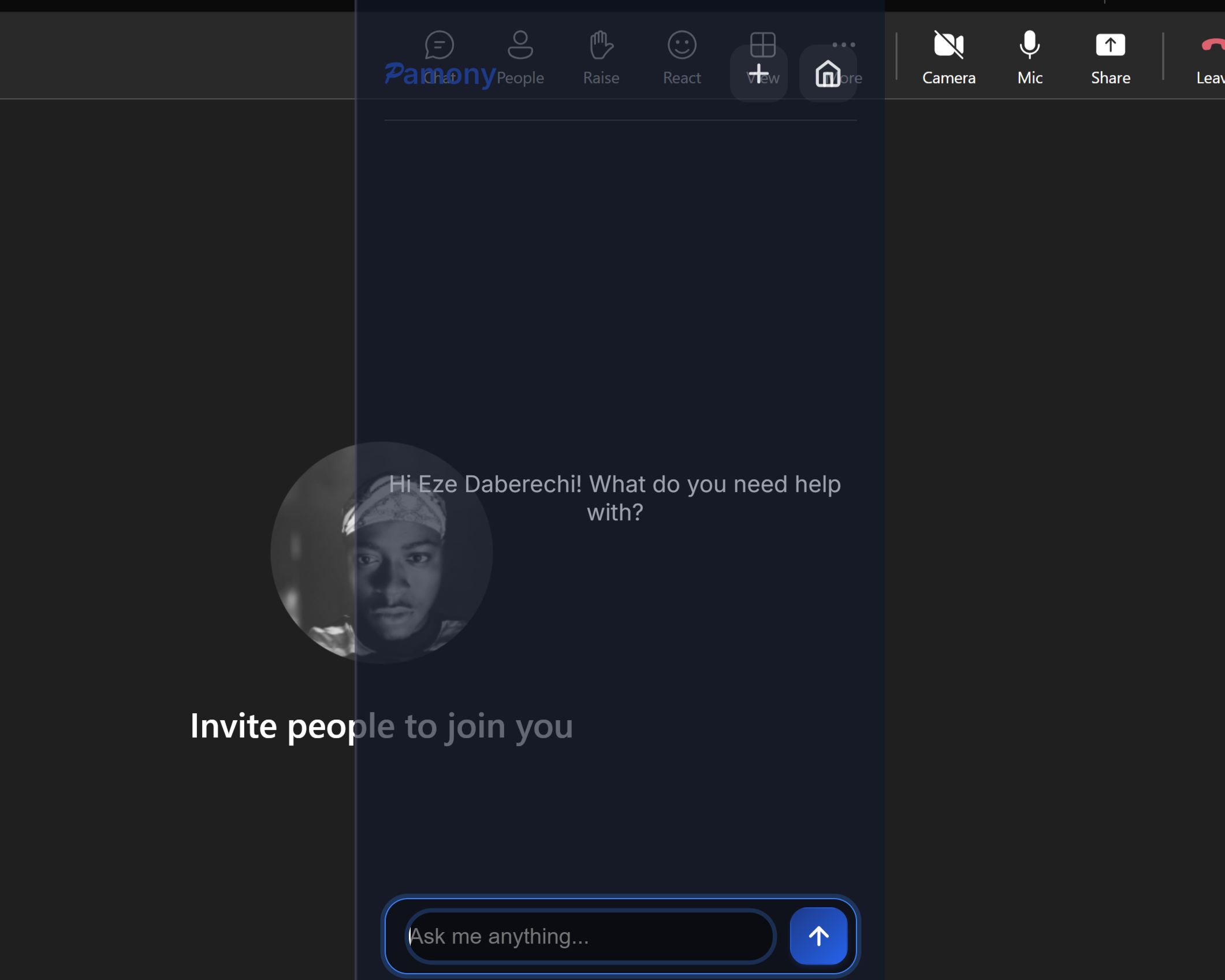
Press Cmd/Ctrl+P. Anywhere. In 0.1 seconds.

Chrome. Zoom. Teams. Slack. Mid-meeting. Mid-screen share. The overlay appears — invisible to everyone else in the room.

No new tab. No alt-tabbing. No "where was that app again?" Your flow stays unbroken. Your authority stays intact.

Invisible to screen shares

Nobody sees you using it. Not in Zoom recordings. Not in screen shares. Your unfair advantage stays completely hidden.

Pamony Ambient UI Overlay
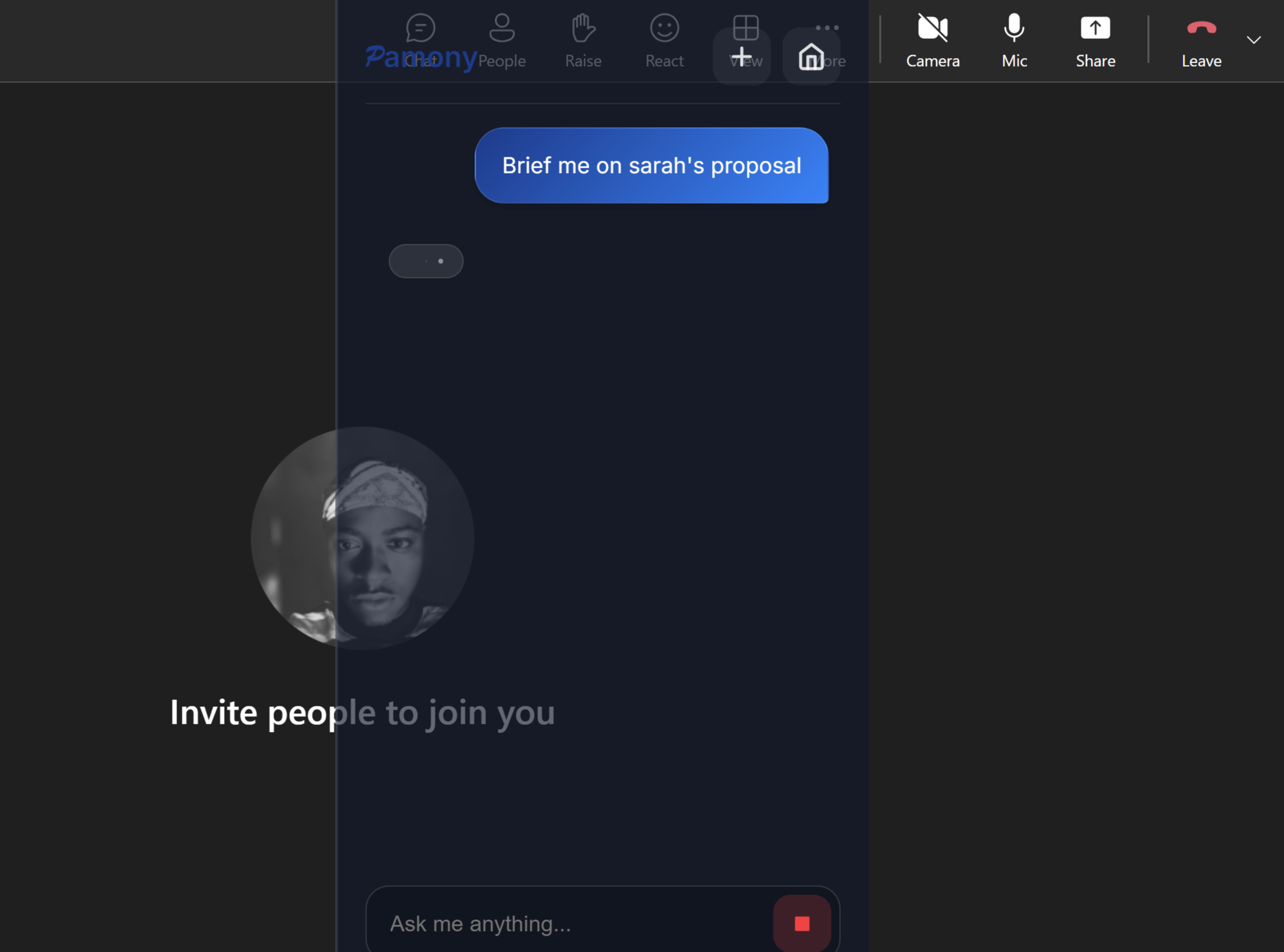
Pamony Ambient UI Typing
Step 2

Type what you need. In plain English.

"Prep my Acme meeting"
"What did Beacon say last month about their budget?"
"Find Sarah's proposal from March"

You are not writing a prompt. You are texting a colleague who has read everything — every doc, every calendar event, every conversation — and forgets nothing.

Step 3

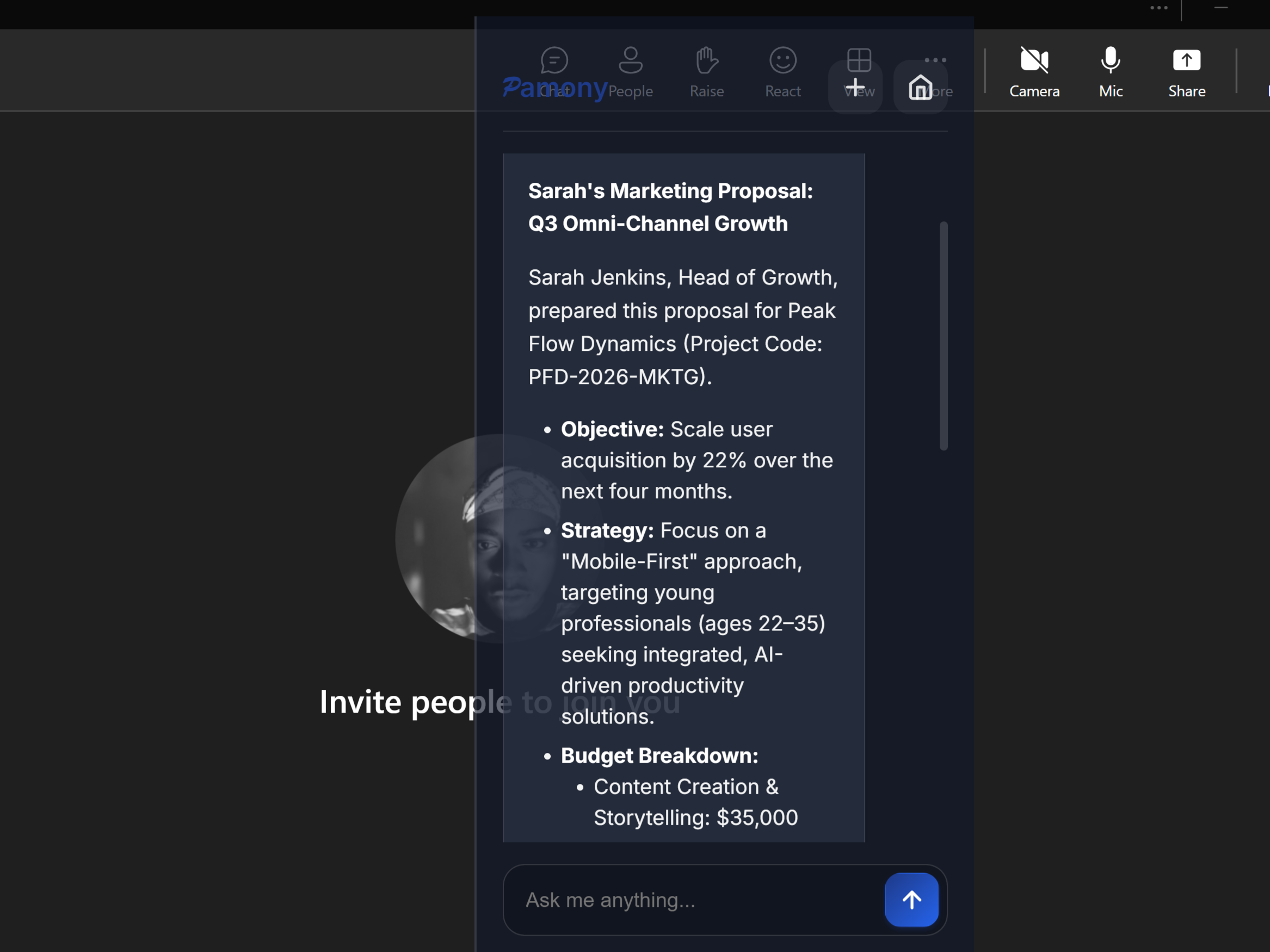
Get the full client picture. In 30 seconds.

Who's on the call. What you last discussed. What they are expecting from you today.

Every relevant file from Google Drive AND OneDrive simultaneously.

An AI-generated brief that would take you 15-20 minutes to assemble manually.

Quick actions (open files, copy summary, join meeting)

⚡ Context recovered: 30 seconds.

vs. 15-20 minutes the old way (95% reduction)

Pamony Ambient UI Results

Your work lives in two worlds — Google Drive for your own files, Microsoft OneDrive for your clients' companies. Pamony sits between both.

Pamony is a web app , with a lightweight desktop overlay that you can access anywhere with Cmd/Ctrl +P on your PC.

Before your next call starts, it automatically recovers everything relevant: the proposal you sent last month, the contract they signed, the notes from your last conversation, who is joining the call and what they expect from you today.

During the call, it stays invisible — open at any moment with Cmd/Ctrl+P — so you can pull any file or answer any question without switching a single tab or breaking your flow.

Total Control Over What The AI Remembers

You sign strict NDAs. Pamony ensures that client data never mixes, and gives you the power to instantly wipe confidential files from the AI's memory the second a project ends.

Slam The Door Shut

Disconnect any service (Drive, Outlook) in one click. Access revocation is immediate and absolute.

A client engagement ends. One click. Their files, history, access — gone. Permanent. Instant.

Instant Memory Wipe

Simply tell the AI: "Forget this file." The agent irrevocably deletes its index in that second.

Sensitive NDA? Tell Pamony to forget it. Gone from the index instantly.

Total Transparency

Your dashboard always displays the precise count of authorized files — forming your secure digital perimeter. Always know exactly which client files Pamony can see. No hidden indexing. No surprises.

Every other tool only works in one world. Your clients don't.

We work across Google AND Microsoft — simultaneously.

How Big Tech Thinks

Microsoft Copilot

Only works with Microsoft 365. $30/user/month. If you use Google Drive? Too bad.

Google Workspace AI

Only works with Google. If your company uses OneDrive? You're locked out.

Glean (Enterprise)

$50K+ minimum contract. 6-month sales cycle. Requires IT deployment.

How Pamony Works

Universal Platform

Google Drive AND OneDrive. Google Calendar AND Outlook. Simultaneously.

$12/Month

60% cheaper than Copilot. No enterprise contract. No IT approval required.

5-Minute Setup

OAuth login. Connect your accounts. Done. No IT team needed.

Every other tool only works in one world. Your clients don't. That gap is Pamony.

Choose Your Plan

No tricks. No tiers. No "contact sales."
Just simple pricing.

Monthly

$12 /month

That's $0.40 per day. Less than a coffee.

Less than one unbillable hour per month.

  • Auto-Prep meetings in 30 seconds
  • Cross-platform Intelligence
  • Invisible to screen shares
  • 5,000 Credits / month
  • Google Drive & OneDrive
  • Google Calendar & Outlook Calendar
  • Cancel anytime
Get Started
💼 Consultant's Choice

Yearly

$120 /year

Save $24 compared to monthly

  • Auto-Prep meetings in 30 seconds
  • Cross-platform Intelligence
  • Invisible to screen shares
  • 50,000 Credits / year
  • Google Drive & OneDrive
  • Google Calendar & Outlook Calendar
  • Save 17% annually
Get Started

Instant access • Mac & Windows • 60% cheaper than Microsoft Copilot

By subscribing, you agree to our Terms and Privacy Policy

The problem was never your discipline. It was a system with no memory.

Questions you probably have.

Does this work on Mac and Windows?

Yes. Pamony is a web-based application that works on any operating system with a modern browser (Chrome, Edge, Safari, Firefox). The Ambient UI shortcut defaults to Ctrl+P on Windows and Cmd+P on macOS.

Do you train AI models on my data?

Absolutely not. Your data is used only to answer your specific questions and generate your requested briefings. We do not use your proprietary documents to train our foundation models.

What about my data privacy?

We use industry-standard OAuth to connect to your drives. We never index your entire drive. We only access the specific files you explicitly select via the file picker. We act as a secure "processor" of your data, not a permanent storage warehouse.

How is this different from Microsoft Copilot?

Three main differences: (1) We are platform-agnostic, working seamlessly across both Google and Microsoft ecosystems simultaneously. (2) Pamony already knows the meeting context before you ask. (3) Our privacy model is "opt-in" by file, giving you granular control over what the AI can see, unlike Copilot's often broad organizational indexing.

What integrations do you support?

Currently, we support Google Drive, Google Calendar, OneDrive, and Outlook Calendar. We are actively working on integrations for Notion, Slack, and Jira, largely prioritized by user requests.

Why are my OneDrive files stuck on "Processing"?

This is a common security feature. Microsoft access tokens expire periodically. If you see this, simply go to Settings and click "Reconnect" next to OneDrive. Also ensure the file is not password-protected.

Can I cancel anytime?

Yes. You can cancel your subscription instantly from your dashboard settings. No phone calls, no hidden fees, and no hassle.

Is there a free trial?

We do not offer a free trial, but we offer a low entry price of $12/month. We believe the value of saving 10+ hours in your first week will be immediately apparent.

What exactly is Pamony — is it a Chrome extension, a bot that joins my calls, or something else?

Pamony is a lightweight desktop app that lives in your system tray. You access it anywhere on your computer by pressing Cmd/Ctrl+P — in Chrome, Zoom, Teams, or Slack. A translucent overlay appears on screen. It is not visible to screen shares or Zoom recordings. You are not installing a browser extension or adding a bot to your meetings. Install it once, connect your Google and Microsoft accounts, and it is ready.

I manage multiple clients across Google and Microsoft. Can Pamony keep their data separate?

Yes — and this is exactly what Pamony was built for. Each meeting brief is generated from the specific files and context relevant to that meeting and that client. Pamony does not mix Acme's data with Beacon's. You get the right client's world, recovered instantly, every time you switch.

10 minutes to 30 seconds.
Every single meeting.

That is 520 hours back per year. That is every client call where you walked in knowing exactly what to say, what was promised, and what they need from you today.

Your competitors are still rebuilding their client's world from scratch.
You recovered yours in 30 seconds.

Instant access • Mac & Windows • Cancel anytime